facetshot
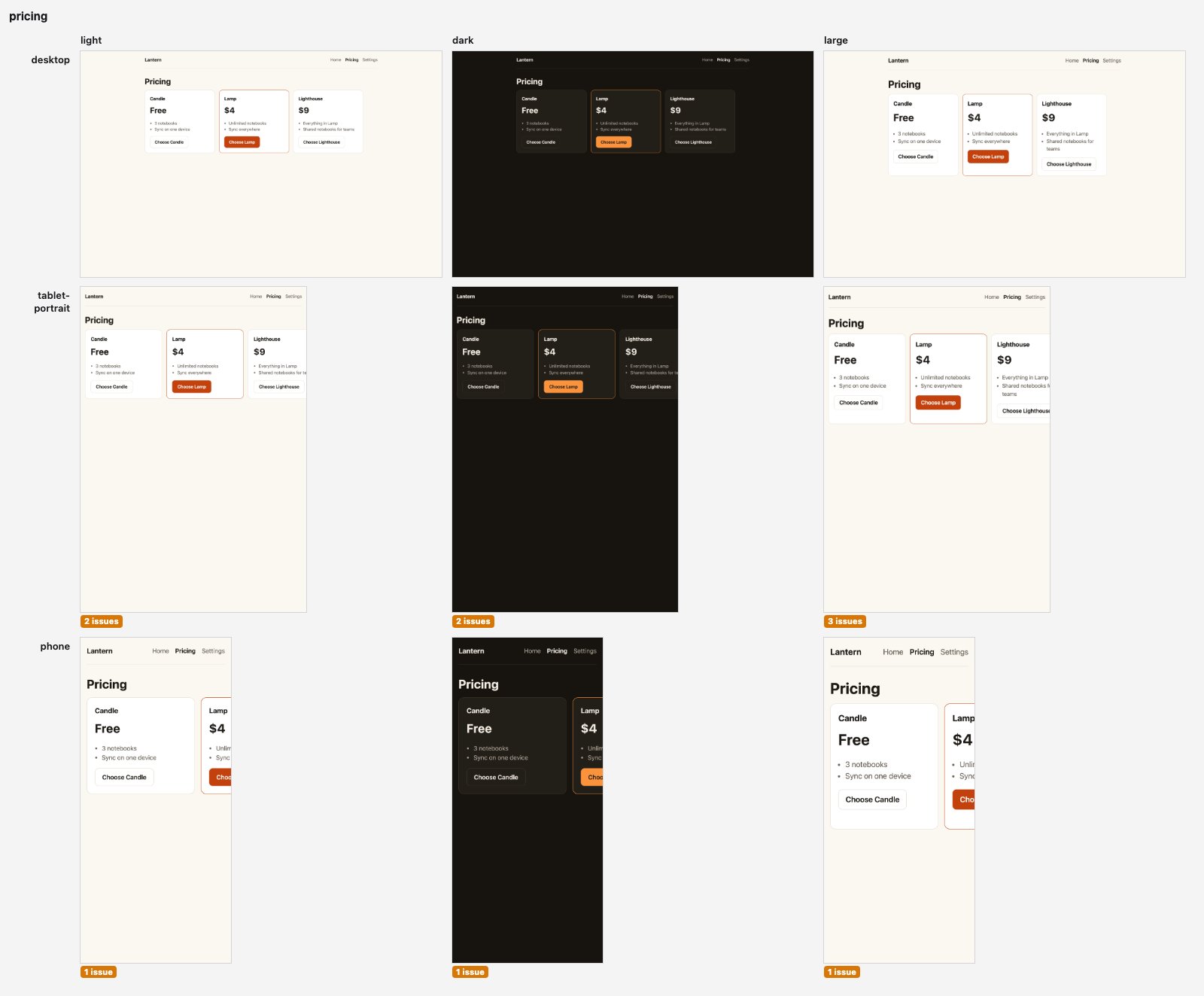
Screenshots of your app's screens on several devices and display settings at once, with what looks broken and what it logged. For people and AI coding agents.
What it is
Section titled “What it is”facetshot puts the screenshots side by side in one image per screen, a contact sheet. It keeps the page’s log (console messages, failed requests) and the output of any servers
it started for you, and facetshot check reads each screen for common problems, such as horizontal scrolling or text
cut off by its box.
How it compares
Section titled “How it compares”facetshot is built on Playwright, which does all of its browser work. Playwright MCP gives an agent a general-purpose browser, and visual regression services fail a build when approved screenshots change. facetshot covers a smaller job: your own app, built, served and signed in, on every device while you work on it. How it compares goes through each tool.
First run
Section titled “First run”-
Install Bun 1.3 or newer, then facetshot and the browser it uses (Chromium, about 600 MB):
bun add -g facetshot && facetshot setup -
Take screenshots of any page, then open the
.sheet.jpgfile whose path it prints:facetshot https://example.com -
In your project’s folder, write a config (
facetshot.config.ts: your pages and how to start your app) and connect your coding agent (claude,cursor,codexorall). Restart the agent and ask it to “check /settings on a phone”:facetshot init --agent claude
Or try it without installing: bunx facetshot https://example.com. Getting started
covers the rest, including what to do when init doesn’t recognise your project.
What you can do
Section titled “What you can do”| Task | Command |
|---|---|
| Look for problems on the screens a change touched | facetshot check / /settings |
| Review a screen on every device, in light and dark | facetshot /pricing |
| Reproduce “the menu is cut off on my phone in dark mode” | facetshot /settings --on phone --as dark |
| See what your last change did | facetshot diff |
| Compare with a run you saved, such as production’s | facetshot / --diff=production |
| Run your release list of pages and flows (saved steps) | facetshot -p release |
| Put the sheets in a pull request | facetshot / --format md |
| Use a screen step by step, as a session | facetshot open /settings --on phone |
Command reference has every command and option.
With an AI agent
Section titled “With an AI agent”The agent gets facetshot’s MCP server (its tools) and its skill (Markdown that tells it when to look and how).
| Agent | Command | Writes |
|---|---|---|
| Claude Code | /plugin install facetshot --marketplace Sung-eon/facetshot |
nothing in the project: the plugin is for all of them |
| Claude Code | facetshot init --agent claude |
.mcp.json, .claude/skills/facetshot/ |
| Codex | facetshot init --agent codex |
.codex/config.toml, .agents/skills/facetshot/ |
| Cursor | facetshot init --agent cursor |
.cursor/mcp.json, .cursor/rules/facetshot.mdc |
| Other MCP clients | register bunx facetshot mcp (standard input and output) |
nothing: point the agent at skills/facetshot/ |
Restart the agent afterwards. AI agents says what each file holds; MCP tools lists the tools.
What it works with
Section titled “What it works with”A screen, step by step
Section titled “A screen, step by step”A session keeps one screen open so you, or an agent, can use it a step at a time. open prints a screenshot, the
log, and what can be clicked or typed into:
$ facetshot open /settings --on phone
s-42cb1d · phone/light · http://localhost:53268/settings · "Lantern"
Screenshot: .facetshot/sessions/s-42cb1d/001.png (390×844, CSS pixels)

Logs (2):
  +0.00s INFO  navigation → http://localhost:53268/settings
  +0.00s INFO  network GET /settings 200 3ms

On screen (6; name one by its ref in a step, e.g. click:e7):
  e7 link "Home" @207,34
  e8 link "Pricing" @270,34
  e9 link "Settings" @343,34
  e14 textbox "Name" @195,222 ("Ada Lovelace")
  e16 checkbox "Send me a weekly summary" @27,272 (checked)
  e18 button "Save" @195,362
facetshot act s-42cb1d "fill:e14=Grace Hopper" click:e18 then does steps by those refs, and close --save keeps
the steps that worked as a flow. See Sessions.
Where to go next
Section titled “Where to go next”Command reference · Sessions · Architecture · Security · Troubleshooting