Architecture
This page describes how facetshot’s parts fit together. You don’t need it to use facetshot; it is for people who want to understand its behaviour, judge its security, or work on its code.
The parts
Section titled “The parts”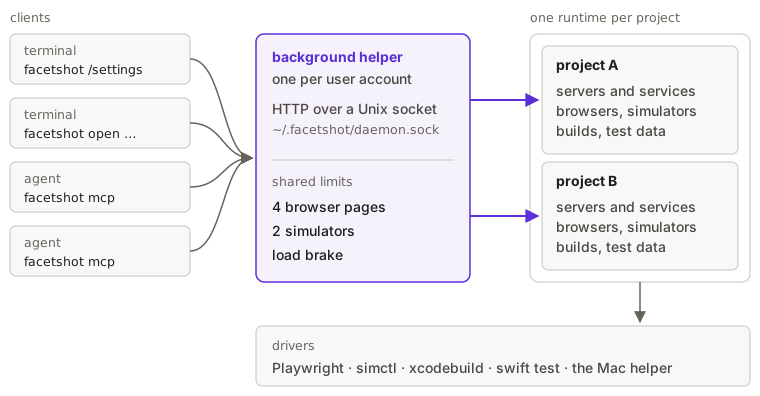
- The command line (
src/cli.ts, sessions insrc/session-cli.ts) and the MCP server (src/integrations/mcp.ts) turn what you asked for into a request. Neither takes screenshots itself. - They send it to the background helper (
src/daemon/server.ts, client side insrc/daemon/client.ts) over a Unix socket at~/.facetshot/daemon.sock(or underFACETSHOT_HOME). The protocol is HTTP. A run (/run) sends one JSON request and gets a stream of JSON lines back (progress, each finished screenshot, then the manifest); session calls (/session/open,act,look,close) are one JSON request and one JSON response;/session/logsstreams JSON lines. If the helper isn’t running, the client starts it. - The helper keeps one runtime per project (
src/engine/runtime.ts): the browsers, the project’s services and the web app’s server, booted simulators, and test data. - Drivers (
src/drivers/, one file per platform) do the work (see the module map). src/output/writes the results: contact sheets, comparisons,report.html,summary.mdand the manifest.
With --no-daemon (or FACETSHOT_NO_DAEMON), the client runs the request in its own process with a runtime of its
own, and closes everything when the run ends. Sessions need the background helper, so they aren’t available then.
The life of a run
Section titled “The life of a run”cli.ts(ormcp.ts) parses the request and callsrunViaDaemonindaemon/client.ts, which makes sure a helper running the same code is up.daemon/server.tsloads the config with the caller’s environment (config.ts), finds or makes the project’s runtime, and callsrun()inrun.ts.run.tsasksplan.tsfor the cells (targets × devices × variants, each target only on devices that can show it), starts services (startServices), makes test data (fixtures.ts), and hands each driver the cells it takes.- Each driver’s
preparebuilds and starts what it needs (engine/build.tsdecides whether a build is needed from its inputs;engine/procs.tsstarts processes), thenshoottakes the screenshots and reports each cell as it finishes. run.tswrites the sheets, comparisons, logs and manifest, and the client prints the summary (output/manifest.ts).
The module map
Section titled “The module map”| Where | What |
|---|---|
plan.ts, presets.ts |
targets, devices, variants and profiles; the built-in devices, variants, groups and profiles |
run.ts |
one run, from plan to manifest; newContext and startServices are shared with sessions |
flows.ts |
the step grammar (parseStep, flow files) and playing steps in a page (doStep) |
drivers/driver.ts |
the Driver interface (handles, prepare, expand, shoot) and helpers every driver uses |
drivers/index.ts |
the drivers, in the order they are asked whether they take a cell |
drivers/web.ts, page.ts |
web pages through Playwright: readiness, checks, screenshots; shared by Storybook, Electron and Tauri’s frontend |
drivers/electron.ts, tauri.ts |
Electron through Playwright; Tauri’s frontend in WebKit and its real window |
drivers/ios.ts, simctl.ts |
iOS simulators, with the UI-test runner in FacetshotRunner/ (built once with xcodebuild, then driven through numbered command files) |
drivers/macos.ts, mac-ui.ts |
Mac app windows: launching, capture, and steps through Accessibility. playOnMac plays a flow in a Mac window, whether facetshot launched a native Mac app or Tauri’s real window |
drivers/mac-helper.swift |
the Swift helper behind Mac windows: lists and captures a process’s windows, reads and acts on them; compiled per source hash into ~/.facetshot/bin |
drivers/swift.ts, FacetshotKit/ |
SwiftUI scenes drawn inside a test |
session.ts, surface.ts |
sessions (below) |
engine/ |
the runtime, process groups and environments (procs.ts, ownEnvironment), builds and caches keyed by inputs, the static file server, locks and the pools (scheduler.ts) |
checks/, logs.ts |
what is read on each page; logs, masking, and app output and system log recording |
fixtures.ts, ports.ts |
test data and its ledger; stablePorts |
listing.ts, doctor.ts, init.ts |
list, doctor, init (and the agent files it writes, with undoAgents, their inverse) |
setup.ts, uninstall.ts |
setup (browsers through facetshot’s own Playwright) and uninstall |
Sessions
Section titled “Sessions”A session (src/session.ts) keeps the order of steps, the log since the last response, and the steps that worked.
What it opens is a Surface (src/surface.ts), an interface with two implementations:
PageSurface: a page in a browser, an Electron window or Tauri’s frontend, read through Playwright’s accessibility snapshot.MacSurface: a Mac app’s window (a native Mac app or Tauri’s real window), read and worked throughmac-ui.ts.
Each surface’s guard says what a step holds while it runs: a slot in the browser pool for a page, or the Mac window
lock for a Mac window. The lock is held per step, not for the session’s life.
How to add a driver
Section titled “How to add a driver”- Write a class that implements
Driver(src/drivers/driver.ts):handlessays which cells it takes,preparegets ready,shootreports every cell it was given. - Add it to
createDrivers()insrc/drivers/index.ts, before any driver that would also take its cells. - If its targets need a new kind or platform, add it to
PLATFORMSinplan.tsand to the device presets. - Add a test under
test/that skips cleanly when the platform’s tools aren’t installed.
bun test test runs everything. Unit tests (plan, cli, config, logs, lock, ports, static) need nothing.
The end-to-end tests start a background helper in a temporary FACETSHOT_HOME and skip what the machine lacks:
Electron and Tauri skip when the example’s dependencies aren’t installed, and mac.test.ts checks the Screen
Recording and Accessibility permissions first and skips the parts it isn’t allowed to do. There is no iOS simulator
test. An edit to any file in src/ replaces the running background helper on the next request (see
Lifecycle).
Environment variables
Section titled “Environment variables”The client sends its environment variables with every request. The helper evaluates the config file with them, so
process.env in the config is the caller’s. What commands and apps facetshot starts get instead is described in
Configuration.
A runtime is replaced when the values the config produces change (for example because an environment variable it reads changed). Changes to files the config imports aren’t noticed until the config file itself changes.
Shared limits
Section titled “Shared limits”The helper owns two pools: 4 browser pages being worked on at once, and 2 simulators. Every run and session from any
project takes its slots from them. A project’s limits can narrow them for its own runs but not widen them. Without
the helper, a run makes pools of its own with the same ceilings.
Before work takes a slot, the pool checks the machine (the load brake). When the 1-minute load average is above 3
times the core count (limits.maxLoad changes this, without the helper only), or the system reports memory
pressure, work goes one at a time; when memory is critical, nothing new starts. The load check is skipped on Windows,
which has no load average.
Heavy builds and Mac window work also take machine-wide locks: folders in ~/.facetshot/locks/ created with mkdir,
which other checkouts and your own scripts can share (limits). A lock whose holder has
died is taken over. Electron launches aren’t locked across runs and sessions; see
Desktop apps.
Lifecycle
Section titled “Lifecycle”- The helper starts on demand, the first time a client needs it, with the environment and the macOS permissions of the app that started it.
- It records which version of facetshot’s code it runs (a hash of the source files’ times). When a client runs different code, newer or older, the helper is stopped and replaced. If it is busy (a run in progress or a session open), the client runs the request in its own process instead, outside the shared limits, and the helper is replaced on a later run. A session can’t be opened then; the client says the helper is busy.
- After 15 minutes without runs or sessions (
FACETSHOT_IDLE_MINUTES), the helper stops. A project that hasn’t been used for 15 minutes gives up its servers and browsers even while other projects keep the helper busy. - An unused session closes after 10 minutes (
FACETSHOT_SESSION_IDLE_MINUTES). - Browsers are closed and started again every 25 runs. If the helper’s own memory grows past 1.5 GB, it stops when it is next idle, and the next run starts a fresh one.
- Stopping has a 60-second deadline. Each step gets 10 seconds, servers are stopped before browsers, and whatever is still running when the helper exits is killed.
The helper writes its own log to ~/.facetshot/daemon.log. Security lists every file facetshot
writes.