Comparing
After a change, you usually want to know what looks different now. facetshot can compare a run with the one before it, or with a run you saved earlier, and show you only what changed.
Against the last run
Section titled “Against the last run”facetshot /settings /billing # before your change# … edit …facetshot diff # the same command again, compared with the run beforefacetshot diff repeats your last command exactly (the same targets, devices and variants) and compares each
screenshot with the same one from the previous run. You can also add --diff to any command:
facetshot /settings --diff # compare with the previous runAgainst a saved baseline
Section titled “Against a saved baseline”Only the last 20 runs are kept. To keep one for good, save it under a name:
facetshot /settings /billing -p fullfacetshot baseline save before-redesign# … days of work …facetshot /settings /billing -p full --diff=before-redesignfacetshot baseline list shows what you’ve saved, and facetshot baseline rm <name> removes one. Baselines are kept
in .facetshot/baselines/. To commit them so your team can share them, ignore .facetshot/* rather than
.facetshot/, and add !.facetshot/baselines/ to .gitignore.
What you get
Section titled “What you get”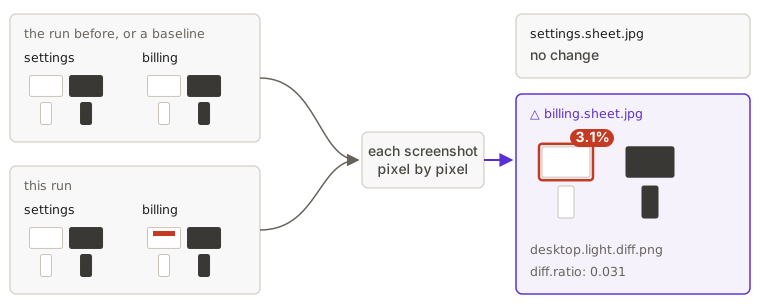
- The summary counts the screens that changed, and marks them with
△in the list of sheets. - On a contact sheet, a changed screenshot has a red outline and a badge with how much of it changed.
- Next to each changed screenshot there’s a
.diff.pngthat highlights the changed pixels. - In
manifest.json, each screenshot hasdiff.ratio: the share of pixels that changed, from 0 to 1.
How “changed” is decided
Section titled “How “changed” is decided”Screenshots are compared pixel by pixel with pixelmatch:
- A pixel counts as changed when its colour differs by more than pixelmatch’s threshold of 0.1 (on a scale from 0 to 1). Pixels that pixelmatch takes for anti-aliasing (the soft edges of text and shapes) are left out.
- Any changed pixel marks the screenshot as changed, however few there are.
diff.ratiosays how many. - A screenshot whose size changed, or that has no earlier screenshot to compare with, gets a ratio of 1.
- The threshold is fixed. There is no setting for how much change to tolerate per screen yet.
If a screenshot changes on every run although nothing changed (a clock, a random avatar colour), see Keeping screenshots the same.
Comparing doesn’t fail a run
Section titled “Comparing doesn’t fail a run”A run never fails because something changed; while you work on a UI, things are supposed to change. If you want a
visual regression test that fails CI, Playwright’s toHaveScreenshot or a hosted service is the better fit. You can
also read diff.ratio from the manifest and fail a job yourself (Continuous integration).